Workflow Automation and Remediation



The problem
Stopping drift, keeping devices compliant, and closing OS and security vulnerabilities all depend on automation that’s actually there when it’s needed — even when the OS, the agent, or the network isn’t.
Most automation breaks when you need it most
Non-automated endpoint management already fails 19.3% of the time in real attacks. But most “automated” platforms have a hidden dependency: they need the OS, the agent, and the network to be healthy to run at all. When those break — the exact moment a fix matters most — the automation breaks with them.

Speed is the new security control. An endpoint that can’t act on its own the moment something drifts is a liability, not a safeguard.
Automation anchored below the OS
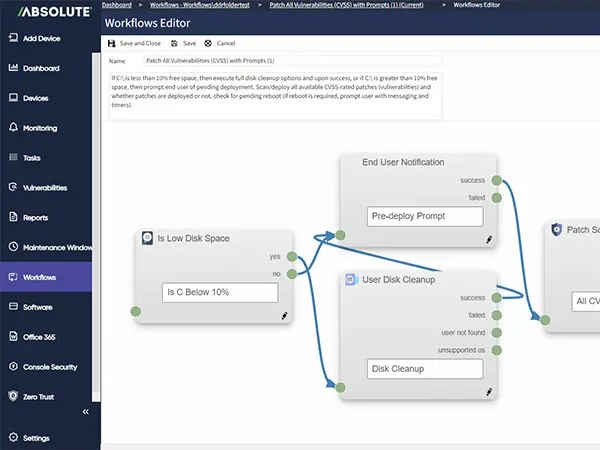
Absolute Workflows runs on a firmware-embedded connection, not just an agent riding on top of the OS. Triggers, condition checks, and actions keep working even if the agent is removed, the OS is corrupted, or the device drops off the network — the exact scenario where other automation platforms go dark. Daily, interval, maintenance window, network change, or user logon triggers pair with a real-time library of device and vulnerability-state checks, so remediation keeps running when it matters most, not just when conditions are ideal.

Essential capabilities for automation and remediation
Daily, interval, maintenance window, network change, user logon, or once — automation runs on your schedule, not a fixed scan cycle.
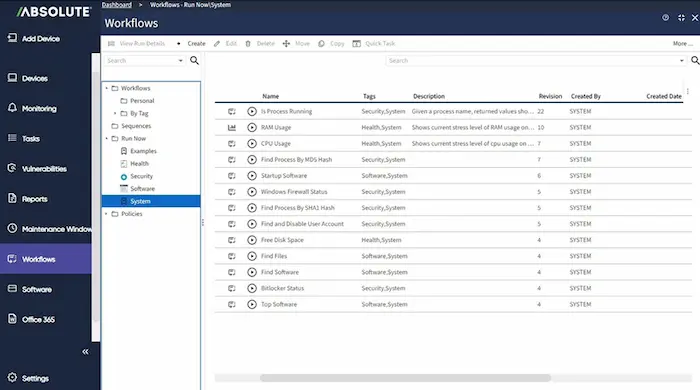
A live library of device and vulnerability-state checks — disk space, BitLocker, firewall, running processes, reboot status, and more.
Runs on a firmware-embedded connection, so remediation keeps working even if the agent is killed or the OS is corrupted.
Patch, reconfigure, or correct user behavior — choose from hundreds of available actions, mapped into ready-to-use or fully custom workflows.
One engine across Windows, macOS, and Linux — no separate tooling per operating system.
Conditions can weigh CVE severity, CISA KEV status, patch age, and exploitability, so the highest-risk issues act first.
The shift from automated to autonomous endpoint management
As threats move faster, IT teams are rethinking what “automation” even means — the difference between running a script and having an endpoint that corrects itself is bigger than it sounds.
- See why AI has compressed the vulnerability-to-exploit window from weeks to days.
- Learn why automation alone isn’t enough — and what true autonomy requires.

See Automation in Action
Set the trigger, the condition, and the action — Cortex Workflows handles the rest, across every endpoint you manage.
- Deploy in minutes: Start from a ready-made workflow or build your own.
- See it live: Watch conditions get detected and corrected in real time.
- Scale without scripts: One engine, thousands of endpoints, zero manual intervention.

Featured Resources
Automation FAQs
Six trigger types: daily, interval, maintenance window, network change, user logon, or once — combined with real-time device and vulnerability-state conditions.
For most remediation tasks, yes — hundreds of pre-built actions cover patching, configuration, and behavior correction without writing or maintaining a script.
Most automation platforms depend on the OS, the agent, and the network all being healthy to run. Cortex Workflows runs on a firmware-embedded connection below the OS, so triggers, condition checks, and actions keep working even if the agent is killed, the OS is corrupted, or the device drops offline — the exact moment other automation stops.
Yes. Policies are stored on the device, so the moment it reconnects, the policy is pushed and executed automatically — helping protect your network even for devices that were offline when the policy changed.
Windows, macOS, and Linux, through one engine — no separate tooling per OS.
Yes. Use ready-made workflows as-is or build fully custom ones from the same trigger, condition, and action library.
Conditions can weigh CVE severity, CISA KEV status, patch age, and exploitability, so the highest-risk issues are acted on first.
Every action logs what ran, why, and when — giving you a verifiable record, not just a completed task.