

Absolute + Microsoft: Self-Healing Security for Windows 11
Intune manages your Windows 11 fleet. Absolute keeps Intune, Defender, and BitLocker running so the job gets done.
Microsoft protects. Absolute stops downtime.
Windows 11, Intune, Defender, and BitLocker give you a strong, cloud-managed security foundation. Absolute Persistence® sits beneath it in device firmware, so when an agent is disabled, a device is reimaged, or settings drift, Absolute repairs Microsoft's own tools and keeps the device reachable. Intune stays in control because Absolute keeps Intune there.
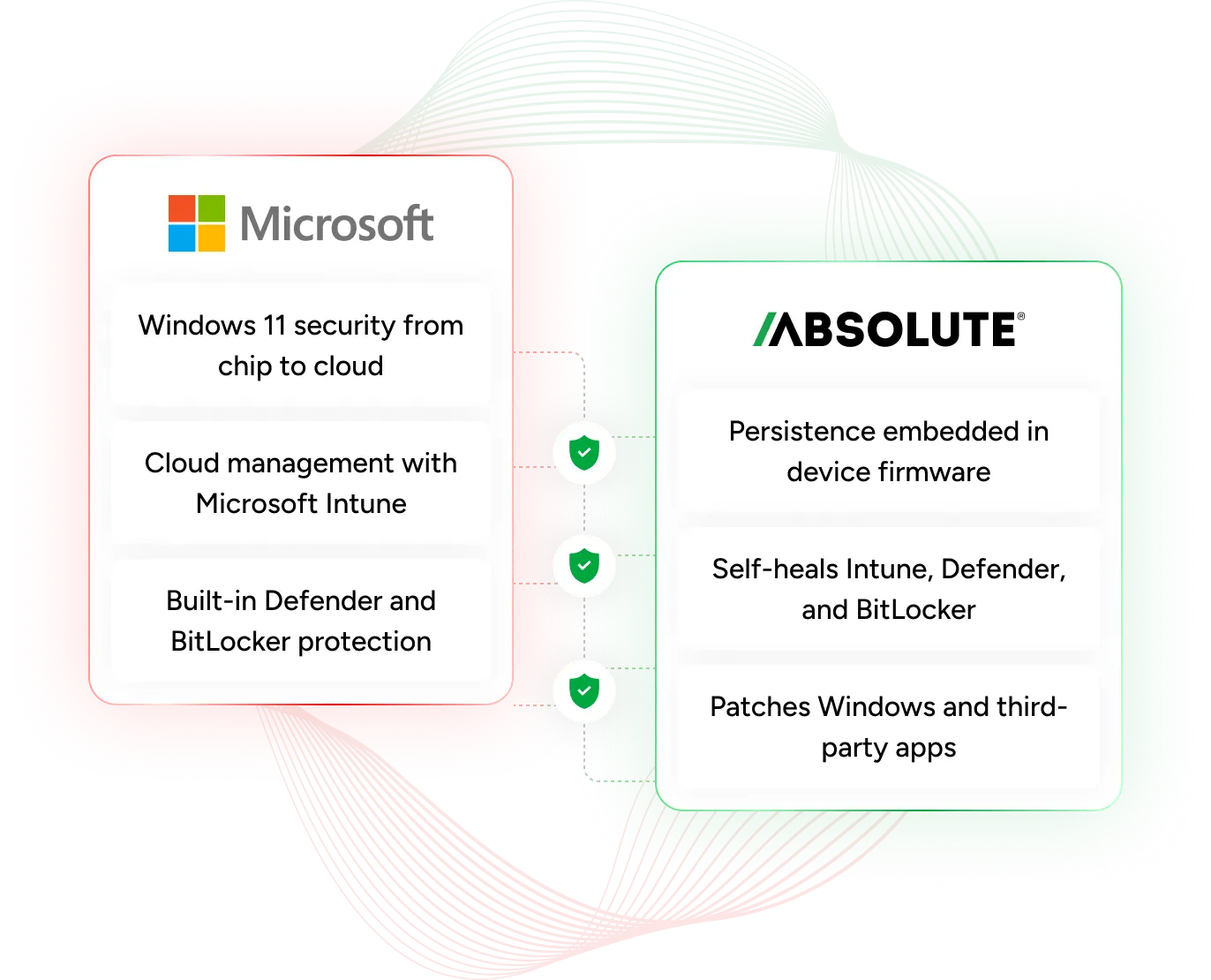
How Absolute and Microsoft work better together
Microsoft built the Windows 11 security stack. Absolute keeps it standing, with a firmware-level connection that repairs Microsoft's own tools on Surface and Windows devices from leading manufacturers.

Absolute monitors Intune, Defender, BitLocker, and Configuration Manager, then repairs or reinstalls them if they're disabled or removed.

Absolute Persistence ships embedded in supported Surface devices, ready to activate with an Absolute license.

Check each device against Windows 11 requirements and track migration progress across the whole fleet in one console.

Absolute patches Windows and third-party apps by risk over its firmware-level connection, even when other agents fail.
Keep Intune and Defender working, even after tampering
Attackers and accidents both take security agents offline. Absolute Application Resilience checks the health of Intune, Defender Antivirus, Defender for Endpoint, BitLocker, and Configuration Manager, then repairs or reinstalls them automatically. IT can report on encryption and antivirus health across the fleet, on or off the network.

Move the fleet to Windows 11 and keep it current
Absolute checks each device against Windows 11 requirements, from processor and memory to Secure Boot-capable firmware, and tracks migration progress fleet-wide. Absolute Resilience for Security then patches Windows and third-party apps by risk, so devices stay current after the move.
Mapped to the Cyber Resilience Framework
Gartner's model for building cyber resilience — anticipate, withstand, recover, and adapt — maps to how Microsoft and Absolute keep Windows 11 fleets protected and running.



Anticipate
Windows 11 builds security in from chip to cloud, and Intune reports device compliance across the fleet.

Absolute tracks the health of Microsoft's security tools and OS versions, flagging devices that drift before they're exposed.
You see both whether devices are compliant and whether the tools reporting it are actually working.
Withstand
Defender and BitLocker protect each Windows 11 device, with policy enforced through Intune.
If an attacker disables Defender, BitLocker, or the Intune agent, Absolute repairs or reinstalls it automatically.
An attacker who switches off protection finds it switched back on.
Recover
Windows 11 recovery tools, including Quick Machine Recovery, help fix widespread startup failures.
Absolute Rehydrate lets IT restore supported devices to the organization's trusted image in minutes, even after OS tampering.
Microsoft fixes what's broadly broken; Absolute restores what's specific to your fleet.
Adapt
Microsoft keeps hardening Windows 11 through its Windows Resiliency Initiative and regular security updates.
Absolute's telemetry gives security and IT teams the fleet-wide data to see what failed, why, and where policy needs to change.
Pair Microsoft's platform updates with Absolute's fleet data to decide where to tune policy next.
Gartner, Gartner’s Cyber Resilience Framework: Anticipate, Withstand, Recover and Adapt, Arthur Sivanathan, Lampis Alevizos, Phillip Shattan, Richard Addiscott, 21 May 2026. GARTNER is a trademark of Gartner, Inc. and/or its affiliates.
Defender goes dark on a laptop or supported Microsoft Surface device. Here's what happens next.

Defender and Intune go dark
An attacker with admin rights stops Defender and removes the Intune agent on a Windows 11 laptop or Microsoft Surface device.
Absolute sees the gap
Absolute's health check finds Microsoft's tools missing and flags the device, even though Windows still runs.
Microsoft's tools come back
Absolute repairs or reinstalls Defender and the Intune agent based on your policy, with no one touching the device.
Managed and protected again
Intune sees the device again, Defender resumes protection, and the attacker's window closes.
Scenario: an attacker disables Microsoft's protections
Microsoft tools restored automatically
The Windows 11 gap most fleets don't see
Absolute's 2026 research shows Windows 10 lingering, Windows 11 patching falling behind, and remote recovery out of reach for most organizations. Each gap is a chance for a security tool to stop working unnoticed.
Frequently asked questions
Intune deploys apps, enforces policy, and manages Windows devices from the cloud. Absolute makes sure Intune's agent, and the security tools it manages, keep running, and it reinstalls them from the firmware up if they're disabled or removed.
Quick Machine Recovery uses the Windows recovery environment to fix startup failures with updates from Microsoft. Absolute works from device firmware to restore Microsoft's security tools and, with Rehydrate, return supported devices to your own trusted image.
Absolute Application Resilience supports Microsoft Intune, Defender Antivirus, Defender for Endpoint, BitLocker, and Configuration Manager, along with many other security and management tools. See the Application Resilience catalog for supported versions.
Most current Surface business devices support it, including Snapdragon X models listed as Business. Rehydrate isn't currently available on Surface Pro devices, and some Surface PCs require the optional Secured-core setting to be turned off before installing the Absolute agent. See device compatibility for the full list.
Yes. Absolute checks each device against Windows 11 hardware requirements and tracks how much of the fleet has moved.
Secured-core PCs harden the firmware, boot process, and identity with protections built into the hardware. Absolute Persistence adds a firmware-embedded connection that keeps Microsoft's security tools running. Microsoft Secured-core and Absolute Secure Endpoint work together to provide multi-layered, chip-to-cloud endpoint protection and self-healing security. Check with Microsoft for a list of compatible Surface PC models.